 有限会社アベブ・エボルブ
Make a Japanese resume on your phone, for free
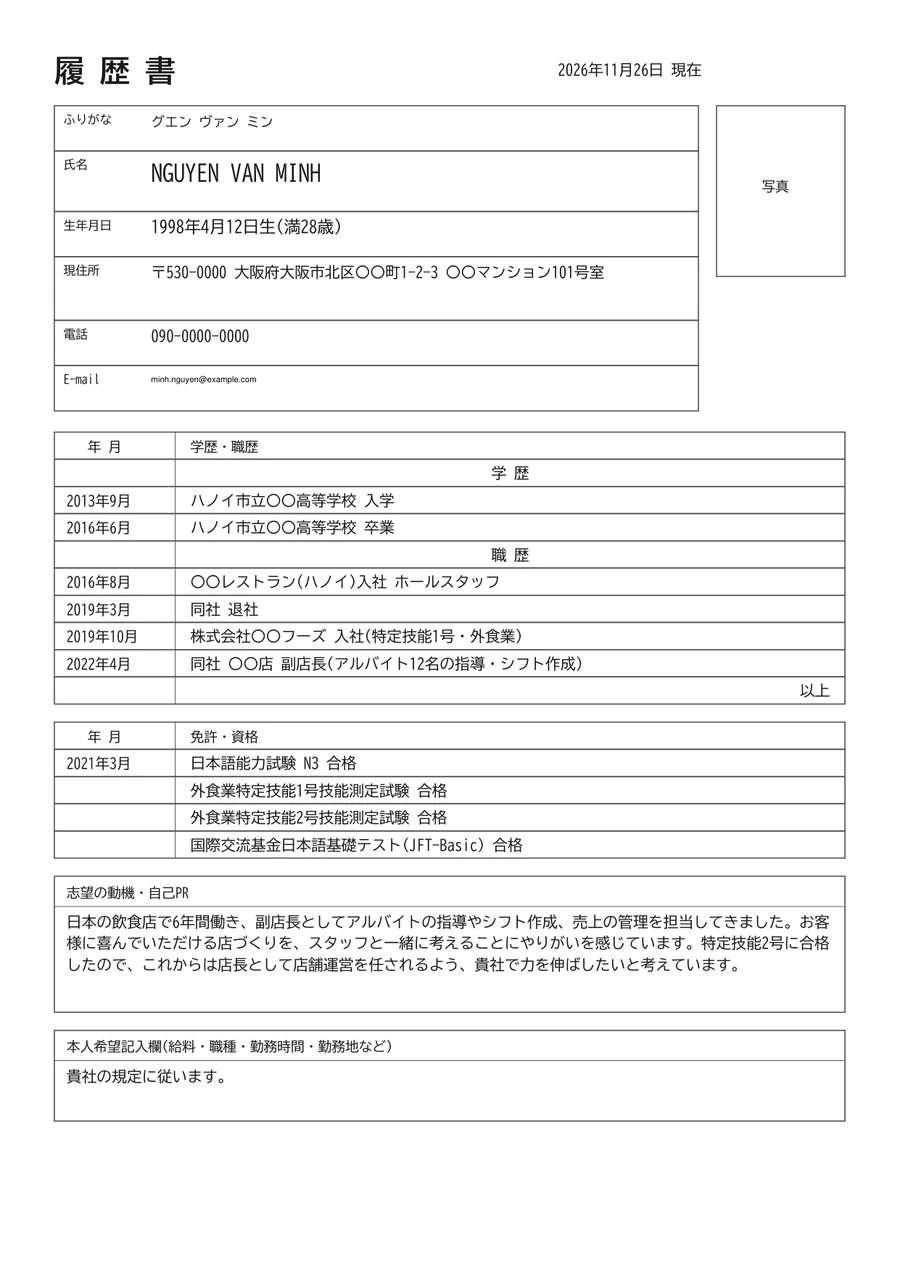
The screens are in your language. From what you enter, we create a resume (rirekisho, A4 PDF) in the format Japanese companies expect. Passed Specified Skilled Worker exams go into the qualifications section automatically.
What you can do
Fill it in in your language
The input screens are available in 9 languages, including Vietnamese, Nepali, English and Burmese. You understand each field, so there are fewer mistakes.
The format Japanese companies use
Education and work history are listed oldest first with Japanese-style dates, ending with “以上” — all arranged automatically.
Passed exams added automatically
Passing the Specified Skilled Worker (i)/(ii) skills tests or the JFT-Basic is written in the qualifications section with the official name.
Save on your phone, edit any time
Save the PDF on your phone and send it by email or other apps. Your entries are saved, so next time you just update them.
How to make it
- STEP 1
Create a free account (email or Google).
- STEP 2
Open “Create a resume” in My Page.
- STEP 3
Write your basic information, education, work history and motivation, then save.
- STEP 4
Upload a photo and save the PDF.
📝 Read how to write a Japanese resume (with sample, in Japanese) →
FAQ
Q.Is it really free?
Yes. Creating and saving your resume is free. The Specified Skilled Worker (ii) food service mock exams and study guide are free too.
Q.Do I have to write the motivation in Japanese?
The resume is in Japanese, so please write the motivation and personal request sections in Japanese. You can fill in the other fields with guidance in your language.
Q.Is my information sent to companies?
No. You download the resume and use it yourself. You only receive offers from companies if you agree to it in your career profile.
Q.Can I make it without a photo?
Yes. Without a photo, only the photo frame is shown. You can add a photo later.
Get your resume ready today
Create an account and start right away.